
AutoBites™
AutoBites automates the import, processing and export of document images
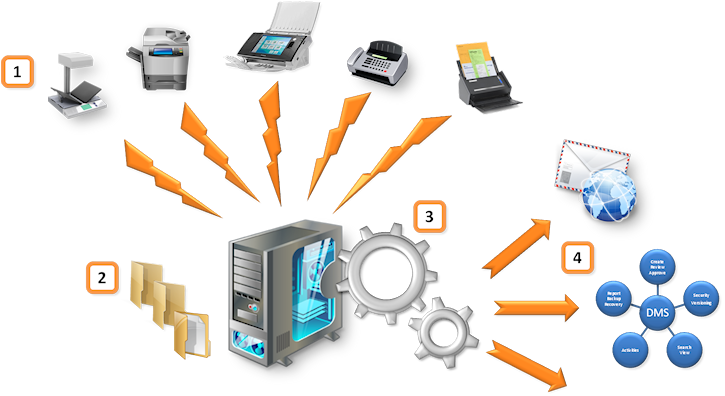
Combined with Kofax Express, AutoBites™ automates the import, processing and export of document images.
Images can be processed with VRS, bar codes recognized and documents delivered to a document management system, database or email inbox of choice.
Run Kofax Express with AutoBites on an unattended computer and scan from one or more MFPs to a watched folder to process the images completely automatically.
IMPORTANT: It’s technically impossible to make AutoBites and the Commander Tool compatible with Kofax Express version 3.3. If you are not able to use Kofax Express version 3.1 or 3.2, we highly recommend to use MetaServer instead.
If you can scan color or gray photo quality, you can use VRS to crop, deskew and convert the images to perfect and compact black & white images.
Or convert images delivered on DVD or USB drive to super compressed searchable color PDF or PDF/A files.
Watch the 5 minute video to learn how AutoBites can be used with network scanners and watched folders.
Use Cases:
- Conversion of existing document image archives to searchable super-compressed PDF files. The original folder and file naming structure can be preserved or changed.
- VRS Processing of document images produced with multifunctional devices to improve image quality, crop, deskew and auto-rotate images. Index data typed in on the front panel can be used in Kofax Express index fields.
- Processing of incoming faxes through a fax server, reading bar codes from faxes and dispatching them to a document management and/or email inboxes of choice.
- VRS processing of documents scanned with a book scanner.
- Compressing document images stored in the cloud to increase access speed considerably and reduce cloud storage space
- Convert electronic PDF files to TIFF images for archival purposes
- Convert image files to PDF/A compliant files for archival purposes
Functionality:
- Watch an unlimited number of sub folder levels
- Use sub folder names or original file names in Kofax Express index fields
- Import TIF (single and multi page), PDF(single and multi page), JPG and BMP images.
- Multiple formats can be mixed in a single folder
- Import both color and black and white images
- Import electronic PDF files (text based PDF files, also known as PDF Normal)
- Pair documents with an XML file to pass through index data typed in on the front panel of a networked scanner or MFP
- Create a document per incoming file or use any of the Kofax Express document separation methods (blank sheets, patch codes, bar codes or page counting)
- Process documents with VRS to deskew, image enhance, auto-delete blanks, auto-rotate etc.
- Read bar codes and use them to name or index documents
- Combine with any of the CaptureBites connectors to digitally imprint, split booklets or folded forms, email documents, export to database, dual export etc.
- Use any of the standard Kofax Express connectors to output processed documents
- Output processed documents in exactly the same structure and file naming as the original input structure and file naming or define it in any other way required
- Leverages Kofax Express background export for staging batches to optimize document processing speed
- Leverages Kofax Express multi-core processing for parallel VRS processing
- Leverages Kofax Express multi-core processing for parallel OCR processing to generate searchable PDF files
Easy to Use
- Start AutoBites
- Select a Kofax Express Job in AutoBites
- Start processing documents automatically
Easy to Setup
- Define a Kofax Express FolderScan Job and set VRS, separation, bar code, indexing and export options
- Adjust some self-explanatory settings in AutoBites or simply use the defaults
- Point AutoBites to a watched folder and start processing incoming document images automatically
Combine this product with CaptureBites MetaTool for advanced index extraction and more
Use this product in combination with CaptureBites MetaTool for advanced index extraction, keyword document separation, floating data extraction, multi-field and drill down database lookup and other advanced functionality.
To learn more about MetaTool, press any of the feature buttons below.

The MetaTool presents itself as a standard Kofax Express export connector and passes through extracted data and processed images to an export destination of choice such as Email, Folder Structure, FTP Server, Database, MS SharePoint Server & Online, Alfresco, OpenText Content Server, Xerox DocuShare, or other DMS systems.
About the download and included demo jobs
The download button on top of this page installs a functional version of this CaptureBites product. It also includes some demo images and a demo job to show the functionality.
In demo mode, a demo seal will be stamped in all exported images. You can switch the demo version to full production mode by entering an activation code which you can purchase from our partners. You can continue using any of the jobs you configured in demo mode after activation of the software.
If you don't have Kofax Express yet, you can download a trial from here.